Showing posts with label apple. Show all posts

Saturday, 20 June 2020

No one is forcefully installing COVID-19 apps on your phone

All these conspiracy theories

I have been seeing shared notices and things on my Social Media timeline about Google and Apple automatically installed a COVID-19 Tracking app on our phones. At first, I ignored the notices, but they were getting pervasive and it will not be long before one of my friends or acquaintances contacts me to confirm whether this was true or not.
It meant one should just put paid to the issue, no one is automatically installing an app on your phone, any app installation would always require your consent along with the express granting of permissions to access features on your phone.
On my Android phone
Now, I do not have an Apple device, but I can check my Google Android device to explain exactly what you can view on your phones. On your Android phone, choose Settings, then choose Google. There, you will see the option COVID-19 exposure notifications. This was a feature pushed to Android phones in the last couple of months as part of an update process. [Forbes: Have Apple And Google Suddenly Uploaded A COVID-19 Tracking App To Your Phone? The Facts Behind The Furore]
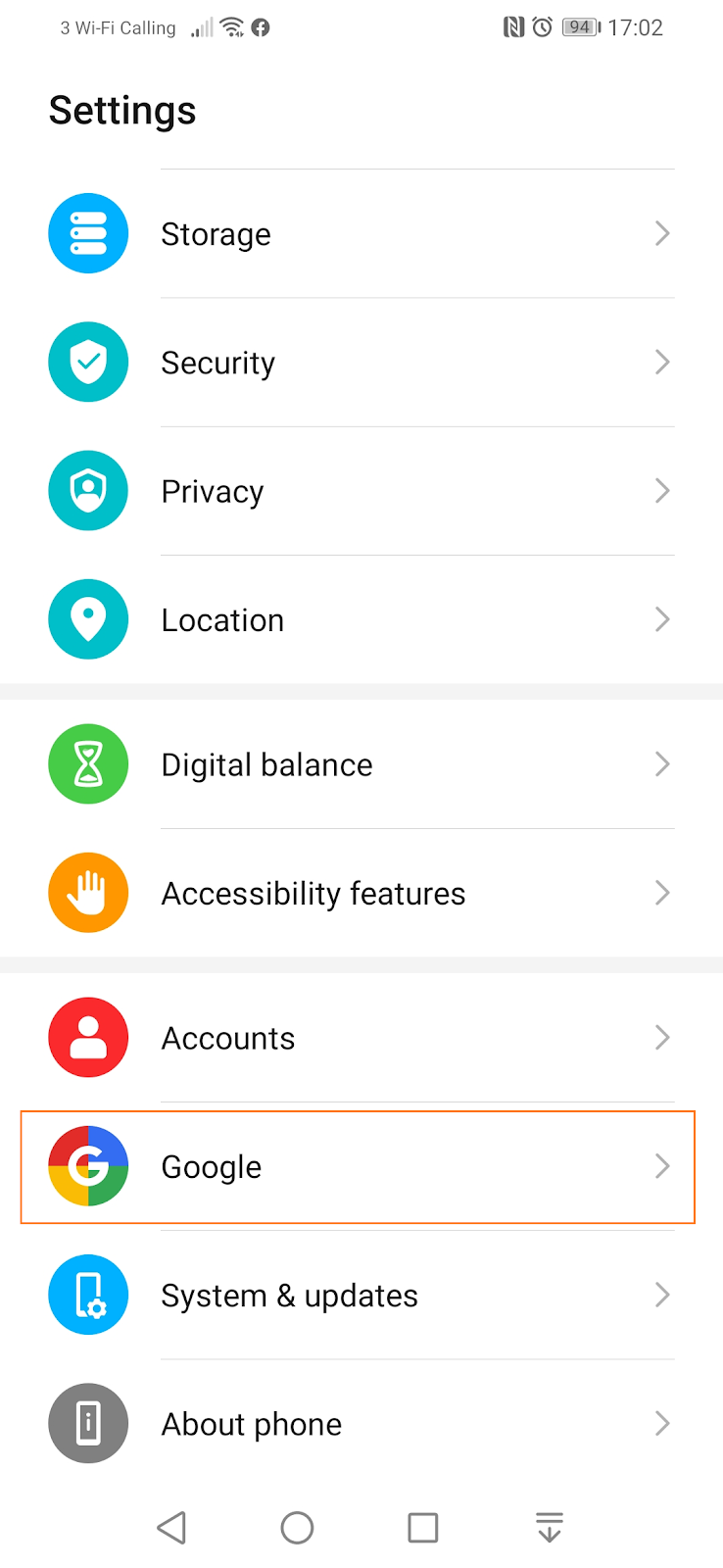
Select Google after you have chosen Settings on your Android phone.

The COVID-19 exposure notifications feature that contains elements you setup and control.

Choosing the COVID-19 exposure notifications, you are presented with a number of options for your phone to be fully engaged in a mobile phone tracking and contact tracing activity. You need to turn on Bluetooth first. Then you need to install and setup a participating tracking app. The original ‘Track and Trace’ app that was piloted in the Isle of Wight for the UK has been shelved, it would not be rolled out in the UK. [GOV.UK: Next phase of NHS coronavirus (COVID-19) app announced]
The COVID-19 exposure notification features you control.
There are plans to develop a new app that takes advantage of the joint Google and Apple COVID-19 exposure notifications feature. Using a road and vehicle analogy, it is basically, a road with traffic stops and markings, open for use by anyone with a vehicle. The vehicle is the app, you need to put it on the road yourself to drive it, else, the road is just there, and you are going nowhere.
[Rant Alert] The app had nothing to do with the NHS, the NHS tag was applied to give the app some legitimacy, the NHS did not commission, tender, build or deploy the app, this was a created by a private company and managed by a committee instigated by the government and headed by someone who once headed a company with major data breaches and who has no expertise in public health or epidemiology. [End of Rant.] [The BMJ] [The Guardian]
You control everything
Furthermore, you have the means to control, delete or turn off the features along with deleting the participating app. Then your phone generates random IDs, these are anonymised identities of your phone that you can share which would link up with other proximity phones participating fully in the COVID-19 exposure notification programme, after the other person has enabled Bluetooth and installed the participating app.
Those random IDs will be deleted after 14 days, you can also manually delete those random IDs at your leisure. Fundamentally, you have to act to be involved, no one is commandeering your phone into a programme you have not actively and willingly subscribed to.
Let your fears be allayed.

Thursday, 6 January 2011

Holiday Snaps: Suffering for being hip

Wi-Fi for social settings

My hotel provides wireless connectivity for Internet access (Wi-Fi) in the main lobby which means people are not locked up in their rooms being anti-social surfing the Net when they could be half interacting with other guests.

I am glad the hotel took my suggestion to provide this service in 2007 and decided not to charge for the privilege – only the Radisson hotel chain on mainland Europe offers this service free of charge, most others charge a fortune for it, it is like being fined for taking a breath having just survived a drowning – Outrageous.

Works for me

My trusty NetBook – Toshiba NB100 with a non-standard 2GB of RAM running Windows 7 – is the ideal travel computer, small enough not to create excess baggage but useful enough to allow me do all I need to do. 17” screen luggables pretending to be laptops are definitely not holiday baggage, surely, but I have seen quite a few of those.

My phone which is a Windows phone – HTC Diamond Touch Pro 2 – has a touch screen and a stylus that I use for Grafitti script a carry-over from Palm Pilot/Handspring days and it works for me but I rarely do much on the phone in terms of writing apart from entering contacts, sending SMS messages or scribbling in URLs, the rest is a swipe, a scroll, a tap and I am fine.

Books are not for kindling

Now, a good few tech-savvy guests have their Kindles and they have been busy reading their novels with ease, I probably should have bought myself an e-Reader too but something about the flipping of pages of paper, the smell, the feel and the fact that you can see how far you have gotten from the binding means a e-Reader would soon wear out its novelty just as my electronic Sudoku toy did – I prefer the Times Sudoku Puzzle books, ink pens and writing to the electronic version.

More so, there are people with Apple iPads, I do not think I have made all my views known about those devices, in fact, most of which would make my blog almost a frontispiece for yellow journalism at best and bordering on the illicit use of words in polite society though it can be put quite subtly, it is not as practical as Always.

Typing like watching bad porn

Whilst I have been fascinated by the iPad, touched it, handled it, ogled at it and half wished for something like it, it cannot replace either my NetBook or my phone and it really cannot do the work of both.

Typing text on a touchscreen has to be worse than watching badly made Manga porn, no clicking keys and no feedback – I do a lot more text than other kinds of media, it just would not do; whilst the direct contact with a touchscreen is definitely more fun than the restrictions of a little mouse tracking pad, the fact is the gadget shop at Schiphol airport is seeing a good deal of iPad accessory keyboards fly off their shelves.

Evidence that something is missing that could make the iPad very useful and fun to use, but let us just say the iPad came with a stylus too and Graffiti Script was added with the ability to write straight to screen than just to a portion of the screen with the necessary technology to convert that handwriting recognition to proper text, the iPad might well be onto something and might just have the chance of replacing other gadgets I have.

However, Apple gives us what they think we must have rather than what people really might want to make their lives easier – for bloggers like me, my review of the Apple iPad might still be consigned to watching other people suffer the pleasures of being hip but quite close to silly too. Alas!

Wednesday, 13 October 2010

Getting Adam's apple but missing Eve's bite

Not a job for machines
I have many a time been at loggerheads with management at the workplace where they have refused to manage and tried to use technology to do the job they should be doing as managers.
I could very well remember once when I was asked to monitor the traffic of a particular employee because his manager thought he was not being productive.
My candid view was that the manager should call the person in for a chat and involve Human Resources if required but this was not a job for technology to do.
It is unfortunate that many organisations tend to inject technology into what should be effective interaction with people; it gets so bad that people sitting next to each other spam each other with unnecessarily cumbersome emails to the point that they begin to misunderstand each other and conflict brews.
Bosses using SMS messages to convey serious life-impact decisions because they have no nerve to address the matter face-to-face.
Who says what is?
However, the most amusing development of this kind of abstraction is exemplified in the patent that Apple was granted [1] to censure “age-inappropriate” messages between youngsters on iPhones.
I found that quite amusing because it infers that technology would identify all so-called “age-inappropriate” language with missing the context of the usage of multi-purpose and multi-contextual words like virgin (new, green, immature) cock (bird, prime), sex (gender, spruce), pussy (cat), kiss (proximity, give-up) to give just a few examples.
False security
Obviously, with this patent which is a sop to the angst-ridden parents or guardians and do-gooder child-protection activists there is the assumption that youngsters cannot develop their own parlance and communication to convey meanings uncommon to adults.
One good example of this variation of meaning was given by a commentator a few months ago, “My step-mother is wicked” would traditionally mean she is bad but could well mean that she is fantastic – I see a patent to confusion giving a sense of false security and protection where once the youngsters realise the censorship they’ll either switch phones or extend their vocabulary.
Shirking the right deed
What is required to good education about healthy communication to develop commendable habits not a filter of communication that would no doubt have big holes in to soon even if the filter is adapt to catch changes in usage and context over time.
It could well be used to prevent communication altogether and what is to say in American someone would not challenge the curtailment of free speech because some decency police squad is sat in Apple’s Cupertino Headquarters getting titillated with youngster expression of adult intent.
Apple might well offer a “freedom from porn” guarantee but I am not as convinced that having gotten Adam’s apple they have prevented Eve’s bite.
Source

Friday, 28 April 2006

iDumbo is going iDeaf

iDesign for iTrendies
I was just beginning to settle down into the notion that one of the best things about the iPod might be because those things do not have iJumbo headphones.
In the pre-iPod days, there were many with their collections of CDs carted about for playback in their portable CD players who had headphones that make you think elephant ears were small.
Nothing wrong with that, however, when you got on the bus or train the drone of the vehicle engines could not drown out that frustrating monotonous note that you heard without being able to piece together the whole music.
It was like there was not enough to give you the persistence of hearing to help you concentrate on other things.
Subconsciously to annoying knowledgeable reaction you find that the noise is more a distraction because of the disorder, a complete nuisance at that.
The quest for the MP3 grail
Now, I belong to the pre-iPod generation when looking for a solution involved good research rather than following the latest fad or trend.
I had acquired motivational speaking material from those 7-ways ideas to faith affirmation talk that you get from Pentecostal circles.
The MP3 could be played back on my computer at home or work, but not on my CD player – so the research began for a player that could play back MP3 files – that was in 2001.
Not only did I want one that could playback but it should be able to read MP3 tags – these being labels that allow information input of track name, track number, album, artist, and genre and so on.
In the process I got the MP3BookHelper application which allows prodigious amounts of tagging and tagging formats including the renaming of files to the tag information.
Then I had to get an MP3 merger that allows fragments of related and consecutive MP3 material to be merged into one contiguous file.
TotalRecorder allowed me to record streaming audio to audio files with the MP3 format using the Lame converter.
Before long I had a library of MP3 files for which a CD based MP3 player would not suffice having the limit of 640 to 700 megabytes.
I needed a multi-gigabyte MP3 player and in the end, I got the Creative DAP Jukebox also known as the Creative Nomad, the more recent offering is NOMAD Jukebox Zen which can handle 20 or 60GB.
This had 6GB of space, could handle all audio file formats, could read all MP3 tags, manageable on both device and from computer.
There was a community of users who provided tools, accessories and ideas about how to get the best out of my jukebox, in fact, I though it was quite hip to see a female passenger with a jukebox only a few months after I got mine.
iJuggernaut of music
Before you knew it, out came the Apple juggernaut and the history of MP3 players was re-written.
So, everyone who seems to be carrying their music has a plastic-looking “ergonomic” device with a set of usually-white ear-plug headphones, it has become so common, it is common.
So, twice today, having thought the design of the headphones had the avoidance of social nuisance built in; I was completely wrong.
Having an iPod with iDesign headphones does not stop iDiots from keeping the volume at a reasonable level for their hearing.
The generation of young trendy people who have sown for the future a guarantee of being hard of hearing leading to deafness early in middle-age are many and sad, besides generally lacking in good social and community skills.
There is no telling iDumbo that iPods are really for personal entertainment; they should keep the volume down.