Showing posts with label android. Show all posts

Saturday, 20 June 2020

No one is forcefully installing COVID-19 apps on your phone

All these conspiracy theories

I have been seeing shared notices and things on my Social Media timeline about Google and Apple automatically installed a COVID-19 Tracking app on our phones. At first, I ignored the notices, but they were getting pervasive and it will not be long before one of my friends or acquaintances contacts me to confirm whether this was true or not.
It meant one should just put paid to the issue, no one is automatically installing an app on your phone, any app installation would always require your consent along with the express granting of permissions to access features on your phone.
On my Android phone
Now, I do not have an Apple device, but I can check my Google Android device to explain exactly what you can view on your phones. On your Android phone, choose Settings, then choose Google. There, you will see the option COVID-19 exposure notifications. This was a feature pushed to Android phones in the last couple of months as part of an update process. [Forbes: Have Apple And Google Suddenly Uploaded A COVID-19 Tracking App To Your Phone? The Facts Behind The Furore]
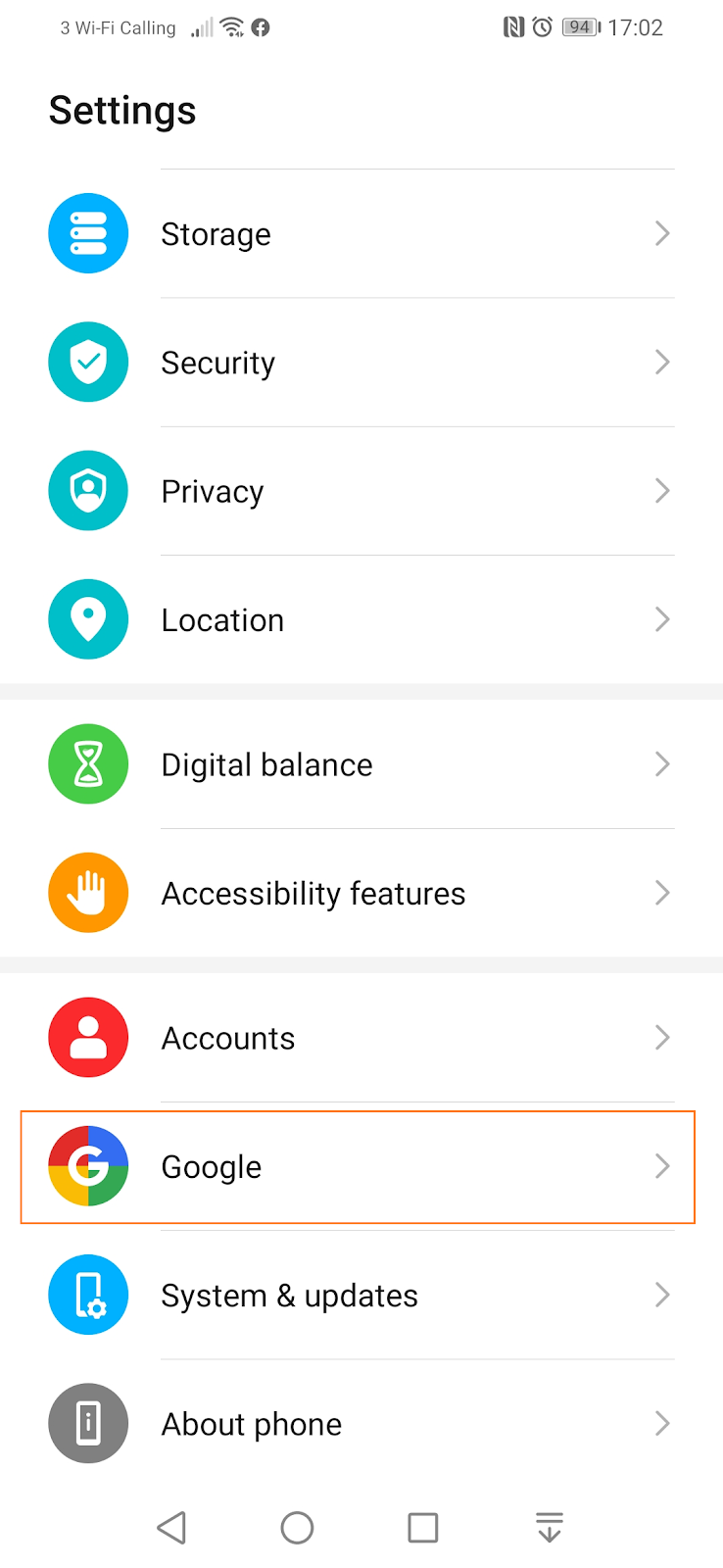
Select Google after you have chosen Settings on your Android phone.

The COVID-19 exposure notifications feature that contains elements you setup and control.

Choosing the COVID-19 exposure notifications, you are presented with a number of options for your phone to be fully engaged in a mobile phone tracking and contact tracing activity. You need to turn on Bluetooth first. Then you need to install and setup a participating tracking app. The original ‘Track and Trace’ app that was piloted in the Isle of Wight for the UK has been shelved, it would not be rolled out in the UK. [GOV.UK: Next phase of NHS coronavirus (COVID-19) app announced]
The COVID-19 exposure notification features you control.
There are plans to develop a new app that takes advantage of the joint Google and Apple COVID-19 exposure notifications feature. Using a road and vehicle analogy, it is basically, a road with traffic stops and markings, open for use by anyone with a vehicle. The vehicle is the app, you need to put it on the road yourself to drive it, else, the road is just there, and you are going nowhere.
[Rant Alert] The app had nothing to do with the NHS, the NHS tag was applied to give the app some legitimacy, the NHS did not commission, tender, build or deploy the app, this was a created by a private company and managed by a committee instigated by the government and headed by someone who once headed a company with major data breaches and who has no expertise in public health or epidemiology. [End of Rant.] [The BMJ] [The Guardian]
You control everything
Furthermore, you have the means to control, delete or turn off the features along with deleting the participating app. Then your phone generates random IDs, these are anonymised identities of your phone that you can share which would link up with other proximity phones participating fully in the COVID-19 exposure notification programme, after the other person has enabled Bluetooth and installed the participating app.
Those random IDs will be deleted after 14 days, you can also manually delete those random IDs at your leisure. Fundamentally, you have to act to be involved, no one is commandeering your phone into a programme you have not actively and willingly subscribed to.
Let your fears be allayed.

Wednesday, 17 June 2020

An obituary to a tablet in its prime

Distended innards

For the past few days, I noticed that the cover case of my Huawei MediaPad M3 Lite 8 was not closing properly. I put it down to the fitting and paid no further attention to it. Eventually, I decided to have a closer look, the screen on the folding side of the case was bulging out for reasons I could not say.
Trying to push the screen back into place simply led to the bulge coming back with a vengeance. That is when I learnt of one of the drawbacks of Lithium-Ion batteries. They have a tendency to bulge out, explode and catch fire.
Apparently, sometimes the chemical reaction within the battery cells which produces gas is not recycled within the electrolytic process leading to the expansion of the fuel cell and affecting the integrity and safety of the battery. [DfR Solutions: Why Do Lithium-Ion Batteries Swell?]
This is put under more stress when the battery is being charged. Sadly, after just 26 months of usage, this is the end-of-life of the device as there are no user-serviceable parts, for the battery is built-in and it is well outside warranty, I need to check that.
Unintended upgrade
Whilst it has been a constant bedside companion especially for radio play during the night amongst other things. It has been a gadget worthy of a Swiss Army Knife accolade, just because of the versatility of apps and functionality I have gotten out of it. It would be consigned now to the graveyard of tablets gone out of service because of all sorts of reasons. The third in 8 years.
In retrospect, it probably was ready for a replacement as Huawei were not offering upgrades to the operating system and user interfaces. It was stuck on Android 7.0 Nougat when many new products are now on Android 10, with Android 11 being released only in February. [Wikipedia: Android version history]
Whilst I await a more current replacement, I have backed up the tablet, tried to extract enough configurations from it and left it to fully discharge. It’s a shame that rather than then CPU, the battery is really the life-giving force of most electronic devices, take out the battery and that’s the end. It is like the human version of cardiovascular disease with the risk of a heart attack more likely than not. C’est la vie!
The side of the screen being pushed out by a swollen battery.

My trust tablet lying in state.

Friday, 17 February 2012

Social Media Engagement: Attributes observed playing games


Another observation
Obviously, it is unscientific of based a whole set of presumptions on an experience that has hardly lasted 24 hours, but one will be hard-pressed not to draw conclusions already.
As I returned home yesterday from a lovely rendezvous with my growing circle of friends made from social media activities that included the rather usual lunch that had a fine lady exhibit her mastery of Nigerian cuisine, she not being remotely African, I reminisced about the many people I have met in person through blogging, tweeting and on Facebook.
Scrabble in motion
The train journey back to Amsterdam was uneventful until at one of the stops a passenger boarded and as he was fiddling with his phone as everyone who has a smartphone does nowadays, out of the corner of my eye I saw he was playing a game that looked like Scrabble.
A few days ago, I did a search on the Android Marketplace for Scrabble and I ended up with a word puzzle – Word Game – which had some addictive qualities working against the clock but nothing like the tradition game.
Rather than be a peeping Tom, I asked the man if the game was Scrabble, it wasn’t but it was a Scrabble clone of sorts called Wordfeud.
Handling the little things
He said he was playing multiple games using different dictionaries with friends all around that world and I thought, when I get home, I will try it out.
Wordfeud is available for use with mainly European languages on the iPhone, Android and Windows 7.5+ platforms with the programmers having the good sense to differentiate between English (US) and English (International) – they deserve the Nobel Peace Prize for just that alone.
There is a premium version that removes all advertisements whilst introducing other features. The board and game is intuitive enough and each language has a different alphabet set with weights and frequencies differing according to the selected language.
A really good imitation
It was not long before I saw the dissimilarities between Wordfeud and Scrabble, the scoring on the board is different with the premium squares allowing for more interesting play, the ratings on the latters also differ – it is amazing how much trivial information one can recall from years of playing traditional Scrabble.
It offers the basic moves as play, swap or miss with the shuffle function that allows for rearranging the letters to form new words but no penalties for wrong words, you are alerted and allowed to reply your turn. There are helpers like Wordfeud Helper and Word Fraud, yes, you can get help without your opponent knowing – such dishonesty, alarming indeed.
Tardy responsiveness
However, the reason for this blog is to highlight an interesting trait I have found which I do believe is a pervasive social media problem.
Apart from Skype calls, most interactive engagement systems are asynchronous, very much like email, you send a message and you cannot pre-determine when a response will be received. In a phone call, there is usually an unstated length of a pause before either party enquires of the other is still in that conversation – that is usually not available for Instant Messaging, Twitter, Facebook or games that are played online.
For this purpose, Wordfeud has given each player 72 hours to respond in play before that player automatically forfeits the game.
Appreciating the situation
My question is why start a game you will not conclude and why is there is no sense of commitment to complete a game you have started, albeit with strangers?
In 8 games that I have started since yesterday, only one has been completed, 2 resigned before 10 tiles had hit the board and one gave up before placing anything.
The other four have been in play for as much as 17 hours, one of which is quite near conclusion. I have decided I will rather be beaten than resign the game and I will most definitely avoid a default.
Wordfeud has options to alert, remind and prompt when it is my turn and I have switched all those options on.
The interesting thing is in a short chat session with one of the tardy, she; yes, she has a female username said she was still in the game but was simultaneously playing multiple games – in other words, I had to be patient.
I would not know if the trick is to win but drawing out the game interminably, I am however glad that Wordfeud does not allow you to resign if it is not your turn.
Playing vulture
If anything, besides the addictive qualities Wordfeud might bring to bear, it allows people to divide their attention in such a way that they are not committed, attentive or engaged to the chagrin of some.
It could also be that the players will rather default than resign or hope that the game is forgotten especially when they are performing badly in the game so as to snatch victory from the jaws of defeat – not with me.
This vulture is a patient bird and regardless of the social media construct, I will ensure I am courteous and responsive to all players that have been randomly selected – niceness should be pervasive, regardless of level of acquaintance, though, I do recognise in certain forums, some people just seek to expose your evils.

Monday, 6 February 2012

My Droid - Installing a new microSD card


An upgrade of sorts
So, I got up this morning and thought; I have a 16GB microSD card in my defunct Windows Mobile 6.5 HTC Touch Diamond 2 phone which I took out of service at the end of September 2011.
My Droid which is an HTC Sensation came with an 8GB microSD card, not that I have used half that storage yet, but the idea that I could double the space was appealing enough.
First, I did a search for the easiest way to transfer all the data and applications from the current microSD card to the bigger microSD card and everything that came up in my search was some convoluted and complicated method of copying the data, I needed to think of a better way.
Preparations
So first, I got the card out of my Windows mobile phone and remembered I had a microSD adapter I had acquired years ago in one of my cupboards. Inserting the microSD card in the adapter I inserted it into the slot on my netbook and copied all the data to a folder on my netbook.
Then I formatted the microSD card to FAT-32 file system and it was ready for usage. As I was doing this, it occurred to me that I could mount the SD card in my Droid as a drive through the USB connection to my netbook.
I mounted the microSD card storage on my Droid, unsure of the best way to copy the data and retain all the security and format of data with the applications on the SD card I decided to use the Robocopy command.
The first copy
Robocopy which comes with the most recent copies of Microsoft Windows is a robust file copy utility that is quite versatile for copy and backup routines.
I used the mirror option which should be used with caution because it wipes the target drive or target folder before copying data. I needed to be sure I noted the source and target drives.
Using Robocopy < Source Drive > < Target Drive  /MIR
Once the files were copied, I replaced the microSD card and restarted my Droid; two errors were displayed, one to do with MSN Messenger and the Economist Apps both of which I had to forcibly close. I could not find them anywhere on my phone so I started up the file manager and found the .android_secure folder was unreadable however with the Astro file manager app I could read the folder.
Using the Android Assistant app, I checked to see if there were any apps on my SD card using the Tools | App 2 SD widget and that revealed there were no apps on my microSD card when I was expecting at least 15 or so apps.
It became evident that the .android_secure folder contained all the apps that I had moved to the SD card and there were no clear solutions to resolve this somewhat annoying quirk much as I did not want to accept the fact that changing microSD cards needed some rocket science tool.
The better copy
So putting my original microSD card in the adapter I loaded it on my netbook then mounted the SD card on my Droid, once again making a good note of the source drive which was now on the adapter I selected all the folders and copied them to the target drive which was now on my Droid overwriting everything. This being a standard Windows copy and paste procedure.
After the copy was completed, I restarted my Droid and all my apps were restored, especially those on the microSD card with no errors.
Now, I have over 10GB of space free on my Droid, looks like there is much more I can put on my Droid, my complete classical music collect and even the complete audio bible that adds up to just over 1 GB.

Tuesday, 18 October 2011

My Droid - HTC Sensation

A history of smartphones

I have been a smartphone buff for years and though my first smartphone conked out on me in Paris in 2004, it was the SPV 200 HTC Phone offered by Orange that I had to settle with a SonyEricsson T610 for the remainder of my contract.

My first full function smartphone was the HTC P3600, I used it for almost 30 months, long beyond the term of the contract but just in time to get the new HTC Touch Diamond 2 (codename HTC Topaz), it was still functioning well into 29 months of usage when I thought I should go for the best new thing in town.

It was never going to be an iPhone but a choice between Windows Mobiles that had served me well or the excitement of an Android phone, commonly known as Droids. I soon realised that the phones no more have styluses, which has been a requirement for my smartphone in that I still liked the handwriting recognition script of Graffiti which debuted on the Palm Pilots and HandSpring Organisers of over a decade ago.

My Droid – HTC Sensation

It came down to a choice between Samsung and HTC, the Samsung looking like I would need sack for a pocket with a holster belt, I decided on the HTC Sensation [HTC] (codename HTC Pyramid).

For the first time T-Mobile my current provider that had metamorphosed or assimilated DutchTone that I first had a contract with in 2003, then Orange and now T-Mobile could provide me with a phone in English rather than my having to order it from online stores.

My HTC Sensation [Wikipedia] is about 20% bigger than my old phone, it does not fit in any of my previous phone cases and there is no case at present that has the easy belt holster of that size as at yet. I noticed the USB port was non-standard but HTC has now separated the audio jack from the USB connection, any standard headphone jack can be connected doubly as an antenna for the FM radio application.

The Android Market

I started charging up the phone in the library as I worked on how to move all my data from my old phone to the new, I decided to leave the SMS Text Messages but get all my contacts, this was easily done by syncing my old phone with Microsoft ActiveSync and then populating my new phone with HTC Sync which was not a doddle to setup; it was cumbersome and clunky having a poor error reporting facility to indicate why there were problems and though I have had a few connections afterwards, it has been a Touch-and-Go system for synchronization.

Almost immediately, I was installing MyPhoneExplorer which seems to offer a better interface and more fully featured components for synchronisation and backup. There is a mobile phone client and a desktop client, the former is best downloaded from the Android Market and whilst the instructions suggest that the USB connection should be on Charge Only, I have noticed that it should really be on HTC Sync for a connection to be made.

One’s history with smartphones will have a tendency to inform about the best tools for a phone, utilities, interfaces, guides, protection and referencing come to mind.

Tools & Utilities

I found AVG had a free AntiVirus, then Android Assistant with 17 features, Android System Cleaner seemed like a sensible download too, the installation of software was so easy, clicking on the install option on a desktop will automatically communicate the download to the phone and complete the installation.

Graffiti for Android came next, though without a stylus, I had to use my finger, I soon found out I had to enable Hardware Keyboard under Graffiti settings to have the Graffiti interface show up.

There is no e-Sword Bible for the Android so I had to make do with MySword Bible, I downloaded Evernote to handle notes then found that HTC had a Notes widget, QR Droid for the fun of it to read QR Codes, Full Wifi to allow for IEEE 802.1x authentication for wireless access points and TweetDeck for Android.

Over time, I found that the HTC Sense user interface was slow and sometimes unresponsive and so I ended up going to SPB Software to get a new home screen SPB Shell 3D which allows for a better arrangement of my applications, utilities and tools; that is the only software I have purchased for my Droid.

I most cases, I have taken time to read the customer reviews of all the applications I have installed to I do not run into the problems they have encountered.

Online at all times

The contacts function of my phone is quite versatile, as it has intelligently combined my standard contacts with email, Facebook, Twitter & WhatsApp contacts that I have a comprehensive address book even more so considering a good deal of my Facebook friends whose phone numbers I never had are now part of my Address Book.

My Droid is always online and it pays to have an unlimited data access inclusive in my phone subscription but I do have to switch on roaming for data when abroad and T-Mobile has changed the access and pricing structure to ensure one does not end up with humongous charges – I remember returning home from Spain in 2007 to a phone bill in excess of EUR 1,400 because Orange was charging EUR 15/MB, I think is it down to less than EUR 2/MB though there are deals that allow for a week of unlimited roaming access in Europe for just EUR 15-.

I have only had my Droid for just under 3 weeks, I am sure there will be more to write about in months, but I can say I have no regrets moving from Windows Mobile, I am not really missing my stylus and this touch thing can be good fun, the swipes, taps, double-taps, pinches and calliper movements all make for an interesting smartphone experience.

It is most likely I will excite Droid envy in iBrick users than they will in me.